Wednesday, 31 October 2007

Toshiba Vardia records HD TV to standard DVDs

Toshiba's RD-A301 could be the breakthrough that HD TV needs

High-definition video recorders, whatever their stripe, are all very well, but wouldn't it be nice if they could use good old cheap DVDs instead of the costly new HD DVD or Blu-ray disks? Well, dream no more - from tomorrow we'll be able to order Toshiba's new Vardia recorder that can do precisely that.

The ¥99,000 (£420) Vardia RD-A301 hits pre-order in Japan tomorrow and will ship there in mid-December. When it does, it will bring with it the handy ability to record broadcast HD TV onto a standard DVD-R.

Transcoding saves space

Using a transcoder that converts high-definition MPEG-2 broadcasts to the smaller MPEG-4 AVC format, the A301 can fit two hours of full quality HD TV on a conventional 4.7GB DVD. We've already seen the transcoding technique used by Panasonic in one of its Blu-ray machines, but that still requires the costly next-gen disk.

The recently industry-approved HD Rec function is flexible too, as it allows high- and standard-definition recordings to share a single disk and can be used to record to the built-in 300GB hard drive. At maximum compression, the drive can hold up to 159 hours of HD TV, while a single-layer HD DVD-R disk stretches to seven hours.

Other features of the A301 include dual HD tuners for recording simultaneous high-def broadcasts and the ability to transfer digital VHS recordings via a FireWire connection. Lastly, at just 69mm tall, the new recorder is considerably smaller than many of the next-generation machines it's likely to compete against.

Canon pulls faulty EOS-1D off the shelves

into halting shipment of its high-end EOS-1D Mark III digital SLR.

Canon has asked dealers to return unsold stock after identifying a fault affecting the Mark III's autofocus system. The company will also repair units already sold, but will not be offering customers any exchange or return.

Product recall

In a letter to camera dealers dated 25 October, Canon claims that the fault is affecting only "a minority" of cameras, and that an official announcement will be made on its website by the weekend.

In the meantime, owners have been invited to contact Canon's technical help desk on 08705 143 723 for more information.

Canon's EOS 1D Mark III has been pulled from the shelves after the company identified a fault affecting the camera's autofocus system

Nokia's Music Store to threaten iTunes

Nokia's new Music Store is set to take on Apple's all-conquering iTunes Store when it launches on Thursday. Nokia gave us a hands-on demo at an event in London's Soho last night.

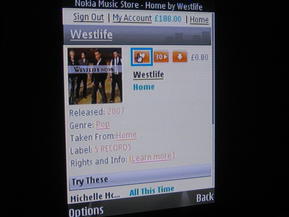
You can browse the Nokia Music Store according to artist, genre, track, album etc.

When you've found the track you were looking for you can add it to your wishlist, play a 30-second clip, or download straight away

If you type in a band name for example, the most relevant results will be highlighted at the top of the search results, with other matches listed below

When you start the download process, your handset will automatically search for a connection...

... after which the download process will start

The service certainly looks impressive. It's fast and easy to use and has plenty of clever features. For example, you can add favourite tracks to a wishlist, buying them all immediately or downloading them later if you don't have sufficient Wi-Fi or 3G coverage.

You can download tracks to your PC or, like Apple's iTunes Wi-Fi Music Store, pipe them straight to your mobile phone. Tracks will automatically sync between your mobile phone and your PC when you hook the devices up.

You can also transfer purchased songs via your PC to compatible Nokia devices, including the Nokia 5310 XpressMusic and Nokia 5610 XpressMusic.

Two million tracks baby

Some two million tracks will be available at launch, ranging from major artists from big labels such as EMI, Sony BMG, Universal Music Group and Warner Music Group, to more independent and local artists. In comparison, the iTunes Store carries over six million songs.

We tested the content by suggesting some obscure artists and tracks, most of which were featured in the Nokia Music Store catalogue. Tracks are offered in high-quality 192kbps audio in Windows Media Audio (WMA) format.

Besides download tracks, you can also opt for the unlimited streaming service available to PC users, for which you'll pay £8 for a monthly subscription. This buys you as much track streaming as you like, all done through the Nokia Music Store's website.

There are plenty of exclusive playlists from various artists and celebrities, if you fancy getting inspired by your idols. The streaming service won't be available over mobile, at least not initially.

Muscling in on iTunes

We think the Nokia Music Store has the featured content and user interface to take on Apple's iTunes Store but cost is still a question mark for us.

Tracks are priced at 80p and albums cost £8, but you have to factor in the data charges from your operator too. With the Apple iPhone and its iTunes Wi-Fi Music Store, you just pay for the tracks as the Wi-Fi is offered free of charge through Apple's deal with The Cloud.

The Nokia Music Store, part of Nokia's Ovi internet offering, will go live at 7am GMT on Thursday 2 November. So far it will only be available on the Nokia N95 8GB and the Nokia N81. The latter is apparently being touted by both Vodafone and O2, Nokia said.

40GB PlayStation 3 has 65nm chip

The new cut-down 40GB version of the PlayStation 3 has the more efficient 65nm version of the Cell processor. That's according to Gamesindustry.biz which spotted the revelation on a German computing website.

The big advantage of this is the reduction in power the massive PS3 will suck from the National Grid. It thankfully also means a reduction in noise levels - useful for all the hundreds of Blu-ray movies you probably won't be watching on it.

A cooler, quieter PS3

The Computerbase.de website cites a 135W rating for the 65nm Cell chip, reduced from 200W as well as a halving of noise levels. Nice work if true, although the PS3 isn't the noisiest console on the block. That honour continues to go to Microsoft's Xbox 360, which can hum louder than a fridge.

The site is also reporting that, due to the change in processor, the console has a smaller heat pipe arrangement and modified motherboard. IBM currently makes the Cell processor and Sony has said that it plans to make further improvements by moving to a 45nm process in late 2008/early 2009.

The £299 40GB PS3 has already stormed the charts in the UK, while it is due for a North American release on Friday.

The 40GB PS3 uses less power and produces less noise

Google phone rumours: free VoIP calls

Yesterday we reported that a Google Phone announcement is due within the next couple of weeks. Now, rumours have bubbled up naming a potential manufacturer of the device.

TheIndiaStreet.com reports that Chinese mobile handset manufacturer e28 is going to be a Google Phone handset manufacturer and also provide the software for the handset.

e28? Never heard of them

e28 is reportedly developing a wireless VoIP system that will reshape the entire mobile industry. If this is one of the foundations of Google's phone plans, it would make it a serious rival to the Apple iPhone.

E28 has been linked to Google's 'GPhone' project. Could the E2881 here be a contender?

Dig around on the e28 website and you'll see that the company already produces a roster of smartphones. Its quad-band R2821 handset is powered by Linux and features Wi-Fi (802.11b) and a digital camera. It's VoIP-capable and also features GPS functionality, which would be ideal for Google Maps.

The Blackberry-a-like E2881 is another option. Again, it's a Linux-fuelled phone. And while it's not as sexy as the iPhone, it's a quad-band handset, ups the Wi-Fi support to 802.11g and packs in a 2MP camera and that handy GPS.

E28 also produces a smaller handset, the R2821. Its GPS functionality would be ideal for Google Maps

VoIP is the next big thing

If these rumours have any truth to them it looks like making free or low-cost VoIP calls on your mobile phone (like the new 3 Skypephone, announced earlier this week) could well usher in a mobile revolution.

India Street also reported that an open Linux platform is likely to be added to the Google Phone. This would allow any programmer to develop add-on applications (such as the ones popping up on Facebook) and easily add those to the device.

The report states that e28 is unlikely to get the exclusive manufacturing rights, suggesting that the likes of LG and HTC are also in with a shot.

Monday, 29 October 2007

World's smallest HD TV set is just 22 inches

Next time you go shopping for a second television set for the spare room or bedroom, chances are it might be one of a new breed of smaller full high-definition TVs, such as the new models introduced today by Sharp.

The latest Aquos LCDs from the Japanese company will go on sale there at the end of November and include the world's smallest full HD TV, which has a diagonal screen measurement of just 22 inches; far smaller than the 40-inch-plus displays common in the HD marketplace now.

1080p over HDMI

Two other sets - 26- and 32-inch models - were also announced, with all three of the 1920 x 1080 TVs sporting dual HDMI ports and capable of displaying full 1080p video. Aside from size, the main difference between the sets is the contrast ratio dropping from 2,000:1 on the 32-inch model to 1,200:1 on the smallest Aquos.

Sharp has also made all three televisions suitable for hooking up to a PC by including a range of analogue and digital connectors and a keyboard-stowage area on the base of the stand.

Although the prices - ¥180,000 (£768) for the 22-inch, ¥200,000 (£854) for the 26-inch and ¥240,000 (£1,025) for the 32-inch - are still in the realm of what most people would spend for a main TV set, competition in the small HD TV market is sure to drive them down quickly and hasten the high-definition spread.

HD TV on a 22-inch set seemed impossible just a year ago.

Will 3's Skypephone change mobiles forever?

Free calls from your mobile phone are on the way as Skype and mobile operator 3 today launched the Skypephone. The move is likely to change the way mobile operators think and will change the mobile industry forever.

3 is unlikely to make vast amounts of money by adding Skype to its handsets. The mobile industry makes most of its calls from voice calls and text messages rather than handsets, which are often subsidised to attract customers. 3 thinks it's on to something much more important, however.

"It's all about customer loyalty towards the brand," Kevin Russell, CEO of 3 UK, told Tech.co.uk at this morning's 3 Skypephone launch in London.

The 3 Skypephone lets you call, IM, chat, or send text messages to your Skype contacts all over the world

Happy customers

"It doesn't cost us much to add Skype functionalities to our mobile handsets, but in return we get happy customers who are likely to stay with us, and spend money on other calls and services too. I think community-based services will be a big thing for mobiles in the future."

Skype said that it wants to add its services to handsets from other operators too, but that it has yet to convince operators that it is a good idea.

"Some operators we've spoken to have told us to go away, and that they're not interested in adding our software to their phones," Michael van Swaaij, acting CEO of Skype, told us.

The handset will go on sale this Friday and is available in black, or white with either a blue or a pink trim

One-button access

VoIP telephony on mobile phones has been a frustrating, complicated experience up until now. The 3 Skypephone, however, keeps you logged in from the moment you sign in, and there's just one button to press to access all your contacts, make calls, start chats, and so on.

There are no different accounts to access, no tedious signing in process, or switching between handsets to make free VoIP calls. To 3 and Skype's credit, VoIP becomes a seamless experience.

3's bold move could change the way the mobile industry views VoIP. Apple seems to have been thinking along the same lines when it announced free Wi-Fi for its iPhone in the UK. At the very least, 3's tie-in with Skype gets the publicity machine rolling at a time when everybody is talking about Apple.

We secured a review sample at this morning's launch and will give you the full low-down on the Skypephone in a few days.


7 things you won't like about Leopard


Time Machine won't let you delete ancient files to free up some disk space. The solution? Buy another hard drive says Apple

We've been living with Mac OS X 10.5 Leopard for 72 hours now and while there's undoubtedly a lot to love, there have been some annoyances too. Here they are in all their frustrating glory:

1. Safari, Mail and third-party plug-ins

If you've splurged on third party plug-ins for Mac apps like Mail and Safari, then you'll be in for a shock. Some plug-ins no longer work at all under Leopard - either because their developers haven't got around to issuing patches yet or because Apple doesn't want you to use them.

The latter is particularly true in the Safari web browser - plug-ins like Red Snapper and FLVR, which worked on Safari 2.0, don't work in version 3.0. Red Snapper and FLVR developer Tasty Apps has even gone so far as to remove the plug-ins from its website - so there are unlikely to be patches for those.

Developers who have found fixes for their plug-ins usually do so using workarounds. The Safari plug-in for SpeedDownload, for example, forces you to use the Unix command line using Terminal before it will install.

2. Stacks and Cover Flow

These new additions to the Mac OS X Finder looked great in the demo we saw at Apple's office off Regent Street. But maybe they're less useful in practice.

Looking at the Documents folder in either Stacks or Cover Flow on our Mac simply shows even more folders. You can't QuickLook into its contents, without repeatedly drilling into the file structure to pull up the documents and pictures that you'd like to see.

The answer we suppose is to trim your use of folders, but that seems counter-intuitive when the purpose of Stacks and Cover Flow is to help organise your Mac life.

We've already discussed Stacks' limited ability to show contents of folders resting in the Dock. If you have more than 10 or so items in a stack, then the stack will automatically switch from Fan view to Grid view, before kicking you over to the Finder.

Hit the 80 icon limit on Grid though and Stacks suggests you kick on over to the Finder to see the rest too. Both of these limitations really only make Stacks useful for short projects and photo albums, rather than as an alternative method of organising your life. In some ways the old nested list view presented when you clicked on a Dock folder in Mac OS X 10.4 Tiger is actually more useful.

3. Networking

Apple has given networking a much needed boost in Leopard - you can now see and access almost any computer (Mac or PC) on your home network. This is great if you want to grab some music and movie files from a desktop in your bedroom so you can look at them on a laptop in your lounge.

Unfortunately the Shared list in Finder also has a habit of showing up stuff you don't want to see and can't access. It displays these somewhat childishly, with an icon showing a bulky beige monitor and a Windows Blue Screen of Death (BSOD).

It's not true either - our locked Wi-Fi access point shows up with a BSOD icon, even though it's on an Apple Wi-Fi router. Fiddling around with the Shared places settings doesn't appear to hide the stuff you can't access either... so they sit in the Finder annoying you.

4. Back On My Mac

This new Leopard feature looks like a doozy. It enables you to grab files from a home Mac using a remote desktop or laptop. Great if you leave a presentation file on a Mac at home. The downside is that you access your home Mac using a .Mac login - and that means any other Leopard owner who knows it can also access your files.

5. Time Machine

Apple reckons that only 4 per cent of people religiously back up their computers, making Time Machine's automated backup system ideal. It really is a no-brainer. The problem comes when your backup hard disk drive starts getting full and you want to delete your oldest archives to free up space for some new ones. Well under Time Machine you can't. Editing and/or deleting simply isn't allowed.

The best suggestion anyone at Apple could come up with was to mothball the old drive and start afresh with a new one. We guess you could also just reformat the drive and start your archives again, but that rather defeats the object of Time Machine in the first place. So if your backup needs are any more than rudimentary, you'll need to look elsewhere for a backup solution.

We've also heard reports that Time Machine doesn't play nicely with the Vault backup tool in Aperture, Apple's pro photography application. This is because they both backup to secondary drives. Conflicts can and will occur.

6. The Finder Menu and the Dock

Apple invented the current vogue for translucent windows and other eye candy in operating systems and it's been scaling back some of its excesses ever since (hello Windows Vista!).

Translucency works best when it adds functionality, but without obscuring what that functionality is for - overlaying simple and temporary playback controls in Leopard's DVD player being a prime example. Where translucency sucks is when it's used for its own sake, like in the new translucent Finder Menu and Dock in Leopard.

Apple says it made the Finder menu translucent because it 'enhances and showcases' the custom desktops it says Mac users like to use. Ditto the new glass shelf design of the Dock. It's see-through and reflective: drag a picture, file or Finder window close to the Dock and its reflection appears on the Dock's surface.

They're both bad ideas. Why?

Because in both cases, the translucency gets in the way. Sometimes you can't tell whether the faint blue glow under an application icon in the Dock is showing because the application is open, or because it's a part of the background. The translucent Finder menu is messy for the same reason.

So too are the Finder's translucent drop-down menus. Drop them down over a document and you get a confusing mish-mash of menu and document. This can sometimes make it hard to pick the right menu item you want.

7. The Beach ball of Death

We haven't quite got to the bottom of this yet, but under Leopard even Apple's native apps sometimes seem to pause for an absolute age before they'll start to do something. Apple shows app bottlenecks like this as a spinning beach ball. You'll see the spinning beach ball a lot when you first start to use Leopard.

We're not quite sure what this random slowness is. It could be because Leopard is beavering away trying to generate thumbnail previews of all your files for you to gawp at in Cover Flow and Quick Look. It could be Spotlight doing its indexing thing. We'll let you know if this slowness slowly disappears. Some slowdown is also inevitable with some apps that aren't yet very Leopard-friendly.

We've certainly experienced lots of inexplicable slowdowns which have forced us to Force Quit applications, relaunch the Finder and even reboot the machine altogether. Even the old fixing File Permissions panacea (an OCD-like obsession for some Mac users) is slow.

We thought we'd give the File Permissions fix a stab in Disk Utility to see if it helped cut down the number of applications slowdowns... only to be greeted with a long 20 minute wait while Disk Utility thought about repairing permissions... and then a 40 minute wait while it actually did so.

This never used to happen in Tiger.

It's not all bad

Some of our gripes with Leopard are minor, others are more serious and will hopefully be addressed in future by Apple and Mac developers alike. Luckily there are still a lot of things that Leopard is good at. You'll be able to find out what those are in the next part of this article.

Apple adds new restrictions to iPhone sales


The Apple iPhone has sold better than a lot of people thought it would


Punters in the US will no longer be able to buy more than two Apple iPhones at a time. And when they do, they won't be able to pay with cash: it's credit/debit card only from now on.

Apple says the idea is to stop people from buying up to five iPhones and trying to make a profit on them by flogging them on sites like eBay.

Apple against unlicensed resellers

"Customer response to the iPhone has been off the charts, and limiting iPhone sales to two per customer helps us ensure that there are enough iPhones for people who are shopping for themselves or buying a gift," Apple spokeswoman Natalie Kerris told the Associated Press.

"We're requiring a credit or debit card for payment to discourage unauthorized resellers."

Apple says that around 250,000 of the 1.4 million iPhones sold so far were bought by people who intended to unlock them. While Apple still makes money on every iPhone sold in its stores, it loses out on the extra revenue it gets from its network partners, i.e. AT&T.

It's been suggested that Apple makes a clear profit of $565 (£276) per phone over two years when a customer buys and activates an iPhone on AT&T. Read: Apple rolling in iPhone money? for more on this.

The Apple iPhone launches in the UK on 9 November. Check back with Tech.co.uk for full coverage.

What Intel's Core 2 refresh means for Apple

Intel's official announcement of the first in its line of second-generation Core 2 chips will mean change among performance PCs. But what does it mean for Apple and its growing band of merry followers?

Firstly, it appears that Apple will take massive quantities of the new Penryn line of chips including the next-gen Xeon server silicon (set to debut alongside the Core 2 Extreme on 12 November).

Extreme Mac Pro

These Xeon chips will, predictably, end up in the Mac Pro. Rumours suggest these will include a 3.2GHz X5482 model. Originally codenamed Harpertown, these chips will also boast SSE4 and L2 cache enhancements of the QX9650 Core 2 Extreme and its mainstream counterparts.

Rumours have also been circling for some time that Apple will have first dibs on the top performing variants of the new chips.

As well as the MacPro refresh, the MacBook Pro series is also to get refreshed with the new Core 2 Duo line. We'll know more about these processors next month but they'll most likely be 2.6GHz and 2.5GHz chips offering 6MB of L2 cache, compared to the 3MB of L2 cache found on current MacBook Pro processors.

Apple's MacBook Pros will get the new version of the Core 2 Duo in the new year

Better battery life

As with all the Penryn chips, they'll be based on the 45nm manufacturing process. That will give better performance for much lower energy consumption. Intel is using new materials in the Penryn line for even better efficiency. Of course, with laptops, that means better battery life.

Apple's MacPros already use Santa Rosa, the latest generation mobile chipset that's also the foundation of Centrino PC laptops.

Sunday, 28 October 2007

Nokia looks into its mobile crystal ball

Nokia has revealed its view of our mobile future at an event at the Nokia Research Centre in Oulu, Finland.

Among the technologies that Nokia thinks will impact the future of connected mobility are more and improved mobile payments and e-banking using near field communications (NFC). We've previously looked at Orange's experiments with NFC.

Sustainable mobile energy sources

Nokia also says that greater emphasis will be placed on the use of more sustainable energy sources for mobiles and related technologies.

The emergence of smart connectivity and beefed up wireless broadband is high up on Nokia's agenda as well. Nokia said that web technologies will continue to drive innovation in the mobile industry forward.

The event, called The Way We Live Next, illustrated how Nokia is working with consumers, companies and research organisations to try out and fast-track new applications and services.

"The world of mobile communications is changing at an ever increasing pace," Tero Ojanperä, Nokia's CTO, said in his keynote speech

Nokia Mosh

Nokia also demonstrated some new concept technologies, including Nokia Mosh, a one-to-many distribution platform where you'll be able to download applications and content for your mobile phone.

Another new technology is Nokia Point & Find, which will help you discover more about your surroundings using the camera on your mobile phone. The handset will display relevant information about what you are looking at, whether it's a building, area, or another point of interest, fetching real-time information from Nokia's servers.

If you're away on holiday, the Shoot to Translate feature might also come in handy. It's a piece of software that translates written characters into another language. The original text is captured with the camera on your Nokia multimedia phone and the translation of the text happens in real time.

Virtual worlds

Nokia revealed how the line between virtual worlds and the real world is blurring, unveiling the first ever photographic exhibition taking place simultaneously in Second Life and the real world.

"The world of mobile communications is changing at an ever increasing pace," said Tero Ojanperä, Nokia's chief technology officer, in his keynote speech.

"At Nokia, we work with experts in the academic, scientific and developer communities, and increasingly importantly, directly in interaction with our customers. Innovation can come from anywhere, and we need to have the tools and flexibility to respond to that challenge."

Don't hold your breath for some of this stuff coming anytime soon. Nokia said its concept technologies are at least a few years away from being launched.


Facebook and RIM join forces on Blackberry

While it has always been possible for Blackberry users to access the popular social networking site, Facebook, for the first time, users will have an integrated application that makes Facebook use much easier.

The two companies, which have been working in secret for the past six months, announced Wednesday that Blackberry smartphones and Facebook are now completely integrated. In fact, the Facebook application will come preloaded onto all T-Mobile Blackberry smartphones.

"By integrating Blackberry's push technology with Facebook's networking technology provides a real time social networking experience away from the desktop," RIM founder, Mike Lazaridis said.

According to Lazaridis, users can take pictures and without emailing them, can go directly to the Facebook mobile page, add captions, and even tag the images. Once complete, the user can upload the photos to the Facebook page with the click of a single button.

Blackberry joins Facebook on integrated app

Interestingly enough, both companies have also allowed Friends using the same integrated Blackberry/Facebook application to be notified immediately that a new picture has been added. Both companies announced that these alerts can be customized with unique sounds that can be assigned to different people. Lastly, the application is integrated into the Blackberry address book so that users can invite contacts to become Facebook friends.

"It's really exciting to see the business community using this communications platform," Facebook co-founder, Dustin Moskovitz said. "Opening the application to more users and developers is really the cornerstone of our growth."

LG Viewty is iPhone wannabe, coming to O2

LG has confirmed that it's 'Apple iPhone killer' KU990, dubbed Viewty, is on its way to the UK. It will be available on O2 from next month.

The touchscreen LG Viewty KU990 handset features an advanced 5-megapixel camera and is the only cameraphone to offer a manual focus option.

Distinctly iPhoney

The LG Viewty KU990 records video at 120 frames per second. Videos can easily be edited and uploaded to YouTube and social networking websites thanks to the built-in 3G connectivity, LG said.

O2 will be offering the LG KU990 under its Viewty nickname. The handset will be available from free on some contracts.

The LG Viewty KU990 will be available from free on some O2 contracts

Xbox 360 finally makes money for Microsoft

Following the news that Nintendo has been raking in cash and that Sony's PS3 division has been making huge losses, Microsoft has revealed that its Xbox arm is now in the black.

The Entertainment and Devices division over at Redmond has posted an operating income for the first quarter (to the end of September 2007), of $165m (£80m). That's in stark contrast to the same period last year when the numbers equated to a $142 (£69m) loss.

The Xbox is starting to make some serious money for the first time, and Microsoft will be hoping that continues

Thrashing PS3 in money-stakes

What's more, Microsoft is confident that its Xbox business will stay profitable for the entire fiscal year, something it has failed to do at all in the seven years since the launch of the original Xbox console.

While the Xbox franchise has made Microsoft $165m, Nintendo has made $1bn from the Wii and DS and Sony's PS3 division has made a thumping loss of $849m.

Microsoft last made a quarterly profit out of its games division three years ago when Halo 2 came out, but it failed to stay in the black for the whole year. It's no surprise that big Xbox games such as Halo 3 and Bioshock can be thanked for sparking renewed interest in the console.

Halo 3 saves the day

While Microsoft makes a loss on every Xbox 360 console it sells, it makes its money back from selling games. A business model which is now starting to pay off, it seems. Sony operates in the same way with the PS3, but unfortunately for Sony, the PS3 is yet to see any quality games on the same level as the likes of Bioshock.

Over all, in the last three months Microsoft made a revenue of $13.6bn (£6.6bn). To put that into perspective, $13.6bn over a three month period calculates to an income for Microsoft of around $1,700 per second. So in the time it's taken you to read this story, Microsoft has made $45,000. Alright for some, isn't it?

LG introduces a new handset to its Shine line

LG has announced a new mobile handset for inclusion in its Shine product line, and judging by its design, it seems the company is looking to bring a more unique and stylish look to its lineup of products.

Dubbed the LG-LB2005H, the new handset is comprised on an entirely wood-like body and features metal accents to make the design even more stylish. LG explained that it was going for a "more natural look" with this handset, and promised the same feature set you expect from comparable products.

LG Wood Shine missing the wood?

LG Wood Shine sports a host of new features

Echoing that sentiment, the LG-LB2005H supports DMB TV, and includes a 2-megapixel camera, an MP3 player, Bluetooth, and an electronic dictionary.

Interestingly enough, LG's decision to call the handset the Wood Shine is a bit of a misnomer. According to the company, the device is not actually made of wood, but is comprised of a wood-like high-end design pattern that looks just like wood.

So far, LG has yet to announce any further details on the phone. Even worse, the company has yet to release any word on pricing or availability. But considering it was originally announced in Korea (LG's country of origin), the phone will probably hit shelves in that country first.

Saturday, 27 October 2007

Mac OS X Leopard: from install to shutdown

It's finally here! The eagerly-anticipated update to Mac OS X 10.5 Leopard has arrived on our desks and will soon be installed on our Macs - a Power Mac G5 and a MacBook Pro. We're expecting all kinds of surprises - good and bad - so pop back often to see how we're getting on.

11.28am - UPS man at the door, with an incredibly small cardboard box. Leopard may be big on features, but it's very small on packaging. It's shiny too with a big silvery X on the front and a purple and black reflective starfield. Inside is the install DVD, a Welcome To Leopard guide and two Apple fanboy stickers. Do Windows Vista users get the same buzz? This is the moment we've been waiting for.

11.44am - Our Power Mac G5 has coincidentally just finished backing up. We started it at 8am this morning. Normally we'd do a clean install - reformat the hard drive, install all the apps afresh - but we feel like living dangerously today. We'll see how silly or not that is later. Our guess is that a lot of people will install Leopard this way.

12pm - Leopard installation is underway. As is usual with Mac OS X, it first prompts you with the language you'd like to use, whether you want to do a straight installation, archive your old files and then install or obliterate everything on your hard disk drive and install a completely fresh copy.

12.08pm - Leopard is checking the integrity of the install DVD before it starts pouring files on to the hard disk. It's now 40 per cent complete. Not much longer to wait.

12.30pm - The DVD check is complete and installation is under way. We have another 10 minutes to wait before the Leopard intro movie kicks in and we can get our hands on the OS. Newbies and upgraders will be pleased to hear that Leopard has relatively low system requirements.

System requirements

It can run on Macs equipped with PowerPC G4 and G5 processors, plus all flavours of Intel-powered Macs. There are some caveats however. PowerPC G4 Macs will need at least an 867MHz processor to run Leopard; others won't be able to take advantage of the full run of features. For example:

  • You'll need an Intel Core 2 Duo Mac to use the blue-screen style animated backgrounds in Photo Booth. All other Macs will need an iSight webcam or a DV camcorder equipped with FireWire.
  • Boot Camp - the program that enables you to run Windows XP or Windows Vista - obviously needs an Intel processor to run.
  • iChat Screen Sharing needs a 128kbps or higher internet connection.
  • Front Row needs a built-in infra-red port and an Apple Remote.
  • For the DVD player to run at its best, you'll need a 1.6GHz processor of any stripe.
  • The Time Machine automated backup tool requires an external hard drive. We upgraded to a 1TB model yesterday for our setup.

You can find full system requirement details on the Mac OS X Leopard - Tech specs page.

12.45pm - Leopard installation is nearly complete. Our Power Mac G5 has rebooted with something that looks suspiciously like a Blue Screen Of Death. It's probably just the Mac OS X updating itself with all the new features. Fingers crossed.

12.55pm - We obviously missed a restart message (or there wasn't one). Our Power Mac G5 has now been restarted.

At home with Leopard

1.03pm - Quick as a flash the Welcome to Leopard intro movie whizzed by and we're now in Mac OS X.

1.05pm - The first thing we're being asked to do is nominate a backup drive for Time Machine. The second we picked it, Time Machine switched itself on and a full system backup has started.

We also just checked the Spotlight desktop search application. The magnifying glass in a blue circle in the top-right corner has gone, and been replaced by a simple black outline on the Finder's menu bar. Spotlight is currently reindexing our Mac - it'll take around three hours for the 750GB's worth of hard drive space.

The Finder's menu bar also doesn't look like the one in Windows Vista at all. The translucent effect has been scaled back massively - probably as a result of user protest - and is mainly white, but with a slight hint of background colour. The Apple Menu logo in the top left has also changed - it's now two-tone in appearance (black / dark grey) to make it look metallic.

Other obvious differences are the Dock (analogous to - but miles better than - the Windows Task Bar) which now has a 3D look when pegged to the bottom of the screen.

Finder menus now ape iTunes 7. Apple has cleared out the confused look introduced by previous Mac OS X updates - metallic, shiny plastic, etc - in favour of a simpler, cleaner, unified look. We're not yet convinced by the look of the new folder icons. Tiger's shiny Aqua folders have been replaced by flat blue versions.

You can see how the changes look on our desktop in pictures 5 and 6.

Next we'll be looking at one of the much-vaunted new features: Quick Look

Quick Look and Cover Flow

1.40pm - Quick Look is a new feature of the Mac OS X Finder than enables you to look at the contents of a file without actually having to open it in an application. This is handy if the file has an obscure name and you want to have a look at its contents. Or you can use it to find a photo you're looking for without having to boot up iPhoto, Aperture or Photoshop, and so on. Select multiple files and you can see all of their contents. You can even scroll through individual pages of a PDF without having to open Mac OS X's native PDF viewer Preview or Adobe Acrobat. To invoke Quick Look, just select the file you want to see and then press the space bar.

You can also use Quick Look in conjunction with Cover Flow - another rip from iTunes 7. This time instead of enabling you to flick through album art, Cover Flow in the Finder enables you to scroll through views of individual files - again handy for finding stuff quickly. We're not quite sure whether it's our Power Mac's fault, but the big, scrollable thumbnails in Cover Flow are very pixellated now. We suspect it's more to do with Spotlight and the fact that it hasn't finished indexing yet.

2.21pm - before we move on to Spaces... we think we've just hit our second glitch. It's relatively minor and it's to do with iCal synchronisation. Don't worry, we'll wake you up when it's all over. It looks like not doing a clean install is causing some conflicts between what iCal thinks should be in our calendar, and what our Mac does or even .mac does. There are 378 conflicts and clicking on 'resolve all similar conflicts using iCal' doesn't seem to work. That means we'll have to do them manually. Crap.

Spaces

2.41pm - We're now looking at Spaces - Leopard's virtual desktop system. This enables you to hive off separate parts of your life into different desktops so you don't get distracted by other applications, and can keep your desktop relatively clutter-free.

Of course, virtual desktops are nothing new, and there have even been versions available for the Mac and Windows before. So why now include it in Leopard?

Frankly on our old 17-inch Apple Studio Display it's easy to see why. There simply isn't enough screen real estate to go around all the apps we want open. By default Leopard enables you to create four different spaces, so you could use one for organising your life - pop open Mail, ICal and Safari, for example. Then pop open another for your music and movies, a third for work stuff - using Word, Excel ,etc - and a fourth for playing games.

The trick when you're busy is to remember which part of your digital life you've compartmentalised where. Once you've turned on Spaces in Leopard's System Preferences, all you need to do is Press F8 to invoke it, then the Up and Down keys or the mouse to pick the one you want. You can even drag applications and documents between spaces. Handy for when multi-tasking like this befuddles the brain.

At this early stage we can certainly say Spaces looks useful, whether it actually will be we'll be able to tell at a later stage once we've used it a few times. It could be one of those things - like Exposé and Dashboard - you simply forget is there after a while. Get into the habit of using it at first and you'll probably never want to go back to the old ways.

Stacks

3.22pm - Along with a much improved Finder, Stacks is another one of those Leopard features that promises to improve the end user experience. Click on any folder in the dock and Stacks presents you with thumbnail images of its contents - at least to a certain extent.

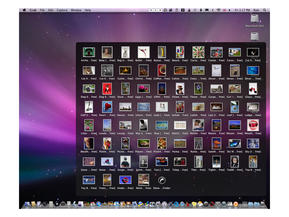
If the folder contains only a few items - such as downloaded files, for example - then Stacks will present the thumbnails in an arc (Apple calls it a Fan). If there are lots of images then you're presented with a Grid - a pop-up menu with a translucent backdrop that presents the thumbnails, erm, in a grid.

In Fan mode, the item nearest the Dock is always the most recent, although you can change the order if you wish. At the top of each stack is an arrow which kicks you over to the file's actual location in the Finder. The same goes for Grid mode too.

However as David Pogue at the New York Times has pointed out, even in Grid mode you can't see everything if there are too many files. It instead shows you a selection and then points you at the Finder view again. This kind of makes sense, but it'd also be good - if a little less aesthetically pleasing - to just see a written list you can scroll through.

Slow, slow, poor Front Row?

3.32pm - Just a quick word about Front Row before we sign off. Front Row is Leopard's Windows Media Center-alike that's been optional on new Macs for a while, but available for everyone. We've tried it here on our Power Mac G5 and it appears to be a little glitchy. Again this is probably because we're already asking the Mac to do too many things (it's still indexing files and backing up the entire contents of our hard drives remember).

Normally hovering over a title from your list of movies will show the title and length of the movie, along with a clip from the movie itself. Do that too quickly and the screen goes completely blank before reappearing again. This could also because we only have an ancient 128MB ATI Radeon card, so your mileage may vary.

UPDATE!!! We've solved it: All that messing around with Spaces earlier means we had way too many apps open. Goonishly blaming Front Row and Leopard was our bad. It's running peachily now.

Shut Down

3.39pm - We still have so much to see and do in Leopard that we can't possibly cover it all in one post, or even all in one day. We'll be familiarising outselves with it fully over the next couple of days so we can bring you the full review. We also plan to look again at some of Leopard's new features, core technologies and how it measures up against Vista.

Oh, and don't forget - we'll also be covering just a couple of the Leopard special events happening at Apple Stores across the country. Kick-off is around 6pm. See you there!

Click on a Docked folder in Mac OS X 10.5 Leopard and thumbnails showing its contents Fan out across the

However if there are too many files in a Docked folder, the thumbnails pop up in a Grid. You can also choose whether you're presented with a Grid or a Fan by right-clicking on the Docked folder

Spaces gives you access to a lot more apps that you'd ever be able to fit on a single screen - handy if your display is as modest as ours. You can easily move documents and applications between different different desktops too. This enables you to grab a photo from one space and email it using Mail, which is contained in another

Spaces is a virtual desktop system that's new to Leopard. It's not enabled by default, so switch it on in System Preferences if you want to try it

Quick Look makes it easy to see what an item actually is without having to open an application. It's especially useful for obscurely named files. Or pr0n. Whatever

Mac OS X 10.5 Leopard is here and fresh out of its shrink wrap

Inside the Mac OS X 10.5 Leopard box are the install DVD, Welcome to Leopard guide and two Apple logo stickers

Mac OS X 10.5 Leopard installation is underway on our Power Mac G5

Our shiny new Mac OS X 10.5 Leopard desktop, showing the System Preferences menu. There are lots of new features here, including Spaces - a virtualisation program that enables you to have multiple desktops filled with different apps. You can also see the new 3D dock... which is rather crowded with apps

Time Machine is one of Leopard's biggest new features - it provides automatic, routine backups of your system to an external hard disk drive. It works like Windows Shadow Copy, System Restore and Backup all in one - and is said to work better than all of them


iCal has found a problem it wants us to solve - should we choose iCal over .mac or iCal over Computer? Or either over iCal? Clicking the check box to resolve all conflicts doesn't do anything. Oops


Friday, 26 October 2007

Samsung debuts 'Knight Rider' printers!

Someone at Samsung seems to have a penchant for The Hoff. Samsung's latest laser printers are clearly Knight Rider inspired, with a piano-black finish, 80s style displays and a lid that looks suspiciously like K.I.T.T.'s flickering nose light when the scanner is working.

The new models were demonstrated last night at a jazz-filled event at Ronnie Scott's in London (piano-black is the link, y'see).

Big bandwidth boost for next-gen Intel CPU

More details of Nehalem, Intel's exciting new modular CPU architecture for 2008, have leaked. A massive boost in memory bandwidth, a new socket and a glimpse at the new QuickPath interconnect are the juiciest new titbits.

Due out in late 2008, Nehalem is Intel's next major CPU design following the Core 2 microarchitecture of 2006. As we reported previously, Intel revealed several key Nehalem features at its IDF conference in September.

New Intel roadmap?

The big news was an integrated memory controller, optional on-die graphics, the QuickPath interconnect and models with up to eight execution cores.


Now Japanese website PC Watch reckons it has got its hands on an Intel roadmap that dishes even more dirt. First up is a triple-channel memory controller with support for DDR3 memory at speeds up to 1,333MHz. Intel's current PC platforms are dual-channel.

Don't forget, that new memory controller is now on-chip rather than part of the motherboard chipset. With fully three channels, it should deliver a colossal leap in bandwith compared with existing Intel CPUs.

Hammering HyperTransport

The roadmap also provides the first details of Intel's HyperTransport-bashing Quickpath interconnect. In simple terms, QuickPath will be used to shuffle data in and out of the CPU and peripheral motherboard components.

It gets much more complicated from there. The site quotes a bandwidth of 6.4Gbps for each QuickPath link with each CPU sporting two links. That doesn't compare well with the headline aggregate rate of 41.6GB/s per link and up to three links per chip for the latest HyperTransport interconnect used by competitor AMD.

However, if that figure really refers to 6.4GT/s (or billion transfers per cycle) with each cycle transferring 32-bits, well, things look very different. In that scenario, QuickPath will pack 51.2GB/s per link.

A shedload of bandwidth

Put simply, that's a shed load of bandwidth. Combined with the big boost in memory bandwidth, a picture of a CPU and platform that can shunt an awful lot of data around is emerging. That's a very handy benefit for an architecture that is expected to scale to as many as eight cores.

It will also no doubt help the new dual-socket platform being cooked up to support Nehalem. Known as Tylersberg, PC Watch reckons the new chipset packs no less than four full 16-lane PCI Express 2.0 slots connected over QuickPath links via IOH bridge chips. Again, the implication is of immense bandwidth.

Hello HyperThreading

Elsewhere, the roadmap confirms several officially announced features including HyperThreading, which allows quad-core Nehalem processors to simultaneously crunch eight software threads.

Intriguingly, it also suggests that Intel's desktop chips will remain pegged in the 3-3.4GHz region for clockspeeds. That's very plausible given the 3GHz top speed of its recently-launched 45nm Penryn processors. More importantly, it means Nehalem chips will have to deliver a significant boost in clock-for-clock grunt if they are to crank out more performance overall.

For the record, Nehalem chips are codenamed Bloomfield in single-socket form and Gainstown in dual-socket trim. Both will reportedly use a new 1,366 LGA socket specification.

So what does Intel say?

When quizzed on the accuracy of the newly-emerged Nehalem specifications, Intel's UK representative remained cool. The usual "no comment on unannounced product" routine was as good as we got. Not that we blame him.

Official launch dates for Nehalem have not been divulged beyond a commitment to ship the new chip before the end of 2008. However, Intel has brought forward the launch of several recent processors. Don't be surprised if Nehalem rolls out before the end of summer '08.


Apple "Leopard" launch in pictures

Apple opened its flagship Apple Store in London on Friday for the launch of its latest upgrade to Mac OS X - "Leopard". At least 1,500 people queued in the chill October air to get their hands on a copy. Check out our extensive picture gallery to see for yourself.

In comparison, for the launch of Microsoft's Windows Vista, PC World's Tottenham Court Road store opened its doors to a queue of around 30 or so people. Apple commands more attention. At the Apple Store, eager Mac owners queued right around the block, along Regent Street and down through Hanover Square.

Mac fans queue for 3 hours

The first people in the queue outside the Apple Store had been waiting there since just after 3pm. Just in case those at the front of the queue were entitled to any freebies. But anyone hoping that Apple's generosity would stretch to a free iMac or new iPod was disappointed. A T-Shirt was their only reward.

There was a palpable air of excitement before the doors opened; excitement not necessarily about the launch of Leopard, but about being part of the launch itself. Apple staff counted down to the opening and applauded the first customers as they muscled their way past security and into the store.

Most people tech.co.uk spoke to said that they'd be back for the UK iPhone launch on November 9. If this is any indication, the Regent Street Apple is the last place you want to queue for an iPhone.

Read Rob Mead's first impressions of Leopard here.

Thursday, 25 October 2007

Samsung F110 phone cuddles up to Adidas

The Samsung F110 Adidas phone is finally on its way to the UK, according to reports this morning.

Aimed at fitness freaks, the F110 Adidas handset boasts functions such as a heartbeat monitor and a step counter, Newlaunches.com reports. They're the gimmicks in what's basically a 'ho-hum' specification, incorporating GPRS/EDGE connectivity, a 2-inch screen, a 2-megapixel camera and an FM radio tuner. There's also an MP3 player for tuning into your favourite tracks when you're out jogging or down the gym.

Reports out today claim the Samsung F110 Adidas phone is coming next month

What does branding add to a phone?

So why partner with Adidas? Why doesn't Samsung just call the F110 a 'sports phone'?

The addition of a top brand undoubtedly adds extra kudos or desirability to a phone. Especially if it's not advanced enough to sell on the strength of its feature-set alone.

LG's tie-up with Prada is a good example of this. Prada got to extend its luxury branding into the mobile phone market, enabling people who had an affinity with the Prada name to extend that to their phone. Got a Prada bag? Here's a slick-looking Prada phone that you can put in it. Simple and effective marketing.

For LG, its partnership with Prada helped boost the fortunes of a touchscreen phone that didn't have 3G, only had a 2MP camera and couldn't compete with Apple's arguably more stylish iPhone.

Getting more personal

The gadgets you own say something about the person you are. We're increasingly being defined by the colour of our iPods, the ringtones we download and the photo we have on our phone's desktop.

It's part of a wider trend towards the personalisation of technology. We've already seen the Levis phone hit the UK; an Audi phone looks like following. Where does the branding end? How long before we get a Harrods phone? Or a range of football club handsets that come with exclusive mobile TV deals?

The Samsung F110 Adidas phone looks like being released this month. No pricing details have been mentioned.

tech.co.uk

Samsung promises 128GB flash drives by 2009

has announced that it's developed the world's first 64 Gigabit (Gb) multi level cell NAND flash memory chip. It's the eighth consecutive year that the density of flash memory has doubled, a feat that bodes well for portable devices like laptops and iPods.

By sandwiching together 16 of the new cells, Samsung says a 128GB memory card is now possible.

Flash to replace hard drives?

Currently, the capacity limitations of flash memory have hampered notebook manufacturers who want to use the technology instead of traditional hard discs. And one of the biggest criticisms of the current iPod touch is that 16GB-worth of storage just isn't enough.

Samsung's breakthrough NAND technology could lead to 128GB memory cards

Samsung's new chips could be the first step towards changing all that. Samsung says a maximum of sixteen of its 30nm flash devices can be combined. The result would be a 128GB memory card that could store 80 DVD resolution movies or 32,000 MP3 music files.

A 128GB card would also be big enough to replace the HDD in a notebook. Apple was linked with so-called Solid State Drives earlier this year. SSDs are not only lighter and faster than hard drives but they consume less power and are also considerably more robust as they have no moving parts.

Lighter, quieter laptops by 2009

These 128GB memory cards are likely to be very expensive, so the death knell isn't quite sounding on the traditional hard drive just yet.

Samsung expects to begin production of 30nm-class 64Gb flash devices in 2009. And according to Gartner Dataquest, the accumulated sales for 64Gb NAND flash and higher density devices could reach up to $20 billion by 2011.

By the end of 2009, iSuppli has predicted that 28 per cent of ultra-portable PCs will use some form of flash memory for storage.

tech.co.uk

32-inch plasma TVs making a comeback

On Monday, the flatscreen TV market stood up and watched with interest as LG introduced the world's only 32-inch Plasma TV. Despite the fact that it doesn't actually look very good, it's interesting to see that plasma technology is now being downscaled into smaller panels - the opposite of what we've seen happening with LCD technology.

And while plasma televisions are typically sized above 42 inches, we could be about to see an influx of smaller ones to join LG's 32-incher. The analysts at iSuppli predict that the global 34-inch and smaller PDP market will grow to 485,000 units by 2011.

LG's 32-inch plasma TV might just be the first of many at this size and price point

Small plasmas on the march?

Small potatoes, maybe, but this is a trend worth watching. iSuppli says they there's enough demand to justify the market reintroduction by LG and that other panel makers are likely to follow should LG succeed.

"LG, with support from numerous Chinese PDP set makers, sees an opportunity to re-enter the 32-inch panel segment after it was forced to exit the market," said Riddhi Patel, principal analyst for television systems at iSuppli.

"The main factor forcing LG out was the fact that PDPs could not compete in terms of price with LCD panels at this size. They also could not compete with the superior resolutions delivered by LCDs. But with the tightness affecting the LCD market, and with demand continuing to increase at this size, LG appears to be willing to take on this challenge again."

The problem with these smaller plasma panels is that they can only manage very small resolutions. The new 32-incher from LG has a resolution of 852 x 480, which is five times lower than the 1920 x 1080 resolutions of full-HD screens.

Far cheaper

The plus side is that small plasma panels can be sold far cheaper. iSuppli says the average selling price for plasma panels sized 34-inches and smaller will decline to $124 (£60) by 2011, down from $215 (£105) in 2007.

"Affordable pricing and an attractive form factor also are reasons why PDP system sales are still growing in the consumer market, although at a far more moderate pace than LCDs," said Patel.

"The 50-inch PDPs are available for less than $2,000 and 42-inch models can be bought for a steal for $1,000 to $1,500. These prices are highly attractive to anyone who is looking at competing LCD technology. The pricing factor has bolstered PDP sales, despite the recent price reductions and higher resolutions for LCDs."

tech.co.uk

Why mobile TV isn't working in the UK

At the recent 'Mobile TV - hit or miss?' forum in London, representatives from the government, the mobile TV industry and technology experts banded together to find out why mobile TV is failing to set the world on fire?' forum in London, representatives from the government, the mobile TV industry and technology experts banded together to find out why mobile TV is failing to set the world on fire.

There's obvious optimism about mobile TV in Europe. "Mobile TV is a great option for catching up on the latest news and your favourite TV shows when you're waiting at train stations and airport," said Christophe Forax, a spokesperson for the European Commission.

But there's also an admission that mobile TV is still a niche offering and far from compelling for consumers. Don't expect a revolution just yet. Juniper Research suggests that "the UK is not expected to relaunch mobile broadcast TV services until 2010 at the very earliest, well behind most of its European neighbours."

Nevertheless, Christophe Forax used the Mobile TV forum to say that he believes it isn't a case of "if mobile TV will take off in Europe, but when". Better, faster technologies are required and more on-demand content is needed to make it a significantly better experience.

Mobile TV has great potential...

Bruce Renny, group marketing director of mobile TV provider ROK, agreed about the great potential for mobile TV. "With three billion handsets currently in use around the world, there are more mobile screens than every TV, computer and cinema screen put together."

UK operators such as T-Mobile, Vodafone and Orange already offer their own mobile TV packages, a mix of streaming services and video downloads. The newest initiative, 24/7 Football, is a cross-operator subscription service (£5 per month) backed by Sky Sports, The Sun and the News of the World.

These are baby steps and Renny acknowledges that it's still too expensive and complicated to tune into mobile TV. "People tend to watch TV on their mobiles for just a few minutes compared to hours on a standard TV screen. People don't want to pay to see just a few minutes worth of clips but if broadcast is free as part of a bundle, they will adapt to it."

... but nobody wants to pay for it

The business model so far in the UK is wrong, said Hyacinth Nwana, managing director of mobile media solutions at broadcast firm Arqiva. Mobile TV offerings in the UK are dominated by subscription services and pay-as-you-watch downloads. That needs to change.

"In South Korea, where mobile TV has been very successful, most of the programming is free-to-air broadcasts. Why would you pay for that?" Nwana asked. "If you're on the train home and you can watch EastEnders free on your home TV when you get home, then why would you pay to watch it [on your mobile]?"

People are only prepared for services if they can see a value in them, agreed Barry Flynn, principal consultant at TV technology consultancy Farncombe Technology. "People spend on average around £200 per year on their mobile phone. That includes the subscription cost, voice calls, SMS text messages, data usage etc. Last on the scale comes mobile TV."

The problem, according to Flynn, is that whereas people value all the other functions provided by their mobile phones, they currently see no value in mobile TV. "Even among the people who are aware of mobile TV the uptake is very low," he said.

tech.co.uk

Tuesday, 23 October 2007

Apple sold over 1m iPhones last quarter

The headlines of Apple's quarterly results make impressive reading.

Mac sales up 400,000; a 17 per cent revenue boost for iPods; 1.1 million iPhones and over 10 million iPods out the door. Somehow the near-70 per cent rise in quarterly profit of $904 million (£446.2m) is somewhat overshadowed by the sheer number of boxes shifted.

iPhone: a nice little earner

Perhaps Apple's best news? Over 1.4 million iPhones have been sold over the 2007 financial year. It's estimated that 250,000 of these are running unlocked on non-AT&T networks.

The resurgence of the Mac is also clear to see. Apple said it had shipped 2.16 million Macs over the quarter, a new record.

"We're looking forward to a strong December quarter as we enter the holiday season with Apple's best products ever," said Steve Jobs skipping through the meadow of his company's success.

Shareholders wouldn't mind giving him a quick foot rub afterwards, either; Apple's shares have gone up around 6 per cent as a result of the news.

Apple also sold a record number of Macs

Only the beginning

Revenue was posted at $6.22 billion (£3.07bn). But Peter Oppenheimer, Apple's CFO, is already eyes forward. "Looking ahead to the first quarter of fiscal 2008, we expect revenue of about $9.2 billion."

Non-US sales accounted for 40 percent of the quarter's revenue. Apple's yearly profit is somewhere in the region of $3.5bn.

tech.co.uk

Sony begs developers to make games for PS3

Third-party devs preferring Wii and Xbox 360


Poor sales of the PS3 are apparently causing developers to turn their backs on the console in favour of producing cheaper Nintendo Wii games

Sony apparently had to beg third-party games developers to make games for the under-selling PlayStation 3 platform instead of migrating over to the successful Wii and Xbox 360 ones. That's according to Dean Takahashi at Mercury News in the US.

PS3 has hidden depths

"One piece of news that came out this week was that Sony pleaded with third-party developers not to abandon its struggling platform," Takahashi wrote on his blog. "The argument is that the PS3 will show its strength as developers learn how to make games for it.

"But developers know they can staff four or five Wii teams with the same number of people it takes to make one PS3 game. We may have a glut of Wii games soon, but that's not as bad as not having enough games on the PS3."


In September, both the Xbox 360 and Nintendo Wii broke through the 500,000 sales barrier in the US, while the PS3 could only manage 119,400 sales. The PS3 is starting to make a comeback, however. The latest figures suggest that Sony's console has overtaken the Xbox 360 for the first time.

tech.co.uk

Panasonic Toughbooks don't mind getting wet

If you like to pour water on your laptop then drop it on the ground (from a reasonable height), there's only one product for you.

Panasonic's robust Toughbook range already has a unique place in the market. But the new 7 series of Toughbook mobile laptops goes one step further: they're sold as drop resistant up to 76cm, and are now fully splashproof right across the range.

Panasonic gets tougher

There are three new models in the Toughbook 7 series, which replaces the existing 5 series across Europe. It's headed up by the 14.1-inch Y7, which is powered by a 1.60GHz Intel Core 2 Duo processor.

Alongside it, the W7 and T7 are both 12.1-inch 1.06GHz models, the latter with a touchscreen. At the product launch in Cologne this morning, Panasonic product manager Jan Urban poured a jug of water over a Y7, then dropped it on the ground to prove that the word 'ruggedised' is more than just a label.

The Toughbook range has an oustanding track record. Spashproof is one thing, but Panasonic's hard-assed laptops have also been known to stop bullets.

The new Toughbook Y7 is splashproof and can survive a drop of nearly a metre

Don't believe Panasonic's splashproof claims? Witness one laptop and one jug of water

The Toughbook T7 model features a 12.1-inch touch-senstive display

The W7 Toughbook model is suprisingly lightweight - it tips the scales at 1.28Kg

Bulky? Far from it

A strong laptop with a good specification and performance inevitably means lower battery life and an increased weight. Panasonic has sought the middle ground here, so the use of strong, lightweight components is tempered by a lower ultimate specification.

A 0.3mm glass panel, thin magnesium alloy cabinet and 45.9g optical drive mechanism help keep the weight down, to the extent that even the Y7 comes in at just over 1.5kg.

The 7 series will be available in November from Micro Anvica in the UK, with local pricing details yet to be announced. Key specifications released by Panasonic today are as follows:

Panasonic Toughbook CF-Y7: 14.1-inch SXGA display, Intel Core 2 Duo 1.6GHz processor, 1GB RAM, 80GB hard drive, DVD multi drive, 5 hours battery life, 1.55kg.

Panasonic Toughbook CF-T7: 12.1-inch XGA display with touchscreen, Intel Core 2 Duo 1.06GHz processor, 1GB RAM, 80GB hard drive, 7 hours battery life, 1.385kg

Panasonic Toughbook CF-W7: 12.1in XGA display, Intel Core 2 Duo 1.06GHz processor, 1GB RAM, 80GB hard drive, DVD multi drive, 7 hours battery life, 1.28kg

tech.co.uk

DTX: AMD's vision for living room PCs

Remember that we talked before about DTX? AMD's new form factor for small PCs? Thought not. We'd also wiped it from our memory banks. Yet this morning we discovered a post over at Hot Hardware running the rule over a DTX prototype.

The idea is that AMD wants to standardise manufacturing of SFF (Small Form Factor) PCs in much the same way as practically every manufacturer has adhered to the ATX standard for desktop PCs (for as long as we can remember).

Isn't this another BTX?

AMD does have a point. Most SFF designs are proprietary with only the PC's components designed to be interchanged.

AMD wants the DTX standard to be widely adopted

DTX would ensure a standard component design across different manufacturer's products, making systems easier to upgrade. And AMD not only wants to pimp its processors for the format, it also wants to make DTX an open standard. Just like Intel wanted to do with the oft-forgotten BTX. Ah, those weren't the days eh?

The prototype system with Hot Hardware is powered by a low-power AMD Athlon X2 BE-2350 processor teamed with a DTX AMD mobo based on the 690G series chipset - that's the one with Radeon X1250 graphics on board.

tech.co.uk

DivX Connected: streaming tech that works

You name it; in terms of media streamers we've tried it. In fact, we seem to have been talking up media streaming for longer than we'd want to remember.

The notion of taking media from your PC and transferring it across to the family-friendly television over Wi-Fi still has huge appeal, yet the level of participation remains poor. Enter DivX Connected, a branded streaming tech that manufacturers can simply drop into their hardware.

Not so dodgy DivX

DMA (Digital Media Adapter) sales are low. And there's no real evidence to suggest that the Xbox 360 is used to its full Media Center Extender capacity in a significant number of homes. With its fans whirring non-stop, it's far too noisy.


Yet, for our money, using a DMA is the path to follow. Media Center PCs still don't cut the mustard, while a solution like the Xbox simply doesn't support the breath of formats you've probably got on your PC - unless you use on-the-fly re-encoding software.

So can DivX really make a go of it in this market? After a good few days using the first shelf-bound product, the £130 D-Link DSM-330 HD Media Player, the answer looks to be a resounding "yes".

Excellent format support

DivX is a name that's well-known among those who often download content from the internet. Surely we can't delude ourselves that most content watched through these devices is legal? As a technology provider, DivX will surely ensure attention is directed towards boxes such as the DSM-330, not least because of the exemplary support for the kind of formats that go hand in hand with torrents.

The question over format support has always been whether DivX and XviD are supported - and that's obviously not a problem here.

What is impressive about the DivX tech is not so much what it can do - most of the functionality has been seen elsewhere - but the way it does it.

The wireless menu navigation doesn't match a wired experience, but it stays refreshingly quick. Not something you can say of most of the face-twistingly unpleasant DMAs we've looked at previously. It's not that they're short on function, they're chronically short on usability - absolutely crucial for a living room device.

It's an open platform

As well as enabling you to stream music, photos and video, DivX has given Connected some more interesting titbits for us to talk about. Firstly, you're able to stream content directly from the internet. This currently works with DivX's Stage 6 video upload site but other applets will be added soon. Some buffering is to be expected, but the experience works just like a video on your network - you can forward, rewind and pause the content whenever you want to.

And, since the platform is open, anyone can design plug-ins for DivX Connected using its open source SDK. It uses the Gecko rendering engine; the framework behind Firefox.

Yet DivX Connected isn't without its flaws. It needs server software to be operational on a PC unlike, say the Buffalo LinkTheater that can pull it from a network drive. That's a serious problem in our book - if your media is on the network anyway, why should you have to switch on a PC to share it?


D-Link's application of the DivX Connected technology is the DSM-330 - front and back views shown

The DivX Connected interface takes its cue from Windows Media Center

The look and feel is clean and pictures are shown on the interface with little impact on speed


Getting it going

So what's it like to set up? Again, surprisingly comprehensive. While setting up this box, a warning appeared on the screen, telling us the network channel of our wireless network was busy. It advised us to change it. A nice touch.

The interface is clear and crisp and pulls down images for your media from the net. If there is no image (say, for example, for some illegitimate content) a snipped frame from the footage will be displayed instead.

One of the nattier features is the ability to resume from the point last played, as if it were a DVD. The rewind and pause functions work. That's not to say they're exceptional, but if you'd used some of the DMAs on the market, you'd be amazed at how often such basics don't work properly.

Otherwise, the setup goes through a simple diagnostic process depending on the way it's connected to your TV (HDMI, SCART, S-Video, Composite and component are all possibilities) and depending on whether you want it on the wired or wireless network. Like the Apple TV, 720p HD is catered for, but unlike the Apple TV there is no integrated hard drive or iTunes/AAC support.

But that isn't what the DSM-330 is designed for. Instead, what you have here is a box that contrasts with every other example of the genre. And, what's more, it keeps improving - since we set it up, there have been two firmware updates. The price isn't too shabby either.

Key features:

£130
720p HD support
HDMI, SCART, Composite, S-Video and Component video outputs
RCA, S/PDIF, Optical audio outputs
Video Formats: DivX, XviD with MP3 or PCM, WMV9 (transcoded on PC)
Audio Formats: MP3 (Up to 360 kbps), WMA (transcoded on PC)
Supported Image Formats: JPEG, JPEG 2000, BMP
802.11g Wi-Fi or Wired Ethernet connection

tech.co.uk